

ube island
When strong gusts of wind blow through Ube Island, you and your delivery team become stranded in the middle of the town's only bridge, with your delivery truck stuck. Courageous as you are, you brave the winds, collect the townspeople's packages and prepare them for a massive town-wide delivery by blimp.
★ This project is a level design assignment I completed at Herts for my second year in 3D Games.
Project Type: Level Design
Duration: 3 weeks
Tools: Unreal Engine 5


the breakdown
I created this level, keeping in mind player interactivity and exploration. To enhance the player's experience, I developed small, simple features such as an interactive crosshair, an emissive outline for interactable objects, various levels and spaces for the player to wander, and environmental flairs (sliding doors, flickering lamps, ambient lighting). Above are screenshots from the level, of smaller details and pathways.
starting with a story
Following from prompts that were given in class; in bold are my choices, as well as the short concept I was able to come up with. I used these prompts to inspire my level design for this project.
My concept for the project is as follows: a courier whose truck got stuck whilst out on delivery is tasked with locating lost and uncollected packages in time for town-wide delivery via. blimps.


building the map
I primarily used the modelling tools within the UE5 level editor to build up the level. I knew from the start that I wanted my level design to be based in a small town, as mentioned in a concept I developed earlier in the week. I used the ExtrudePolygon tool to make various cliff shapes to build up a landscape which the town would sit on. I decided to keep a valley in the middle of the map, as I planned to put a body of water there.
I continued to develop the base of the town/cliffs by using StaticMeshes and the ExtrudePolygon tool. Using a very helpful YouTube video by Peter Field, I was able to develop a strong blockout of the town layout.
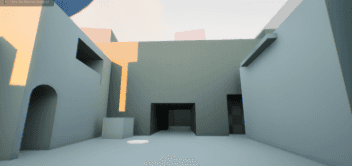
I implemented the idea of using several converging pathways to make the accessible areas bigger than they seem, as a way to control how much of the town I’d be required to plan. Doing this reduced an otherwise incredibly heavy workload, and allowed me to focus on ‘key areas’ of the level. An example is on the left, where I employed different floor levels and doorways to expand a small corner of the town.


interactions
In my level design, I wanted to implement varied modes of travel, such as riding a boat, or climbing staircases to higher levels. My first attempt at this idea is pictured above, where I created a blueprint for a boat to automatically move towards a dock when the player jumps on top of it (via. BoxCollisions and Overlaps).


Creating a glowing outline around interactable objects was a challenging task. Following on from the interactive crosshair blueprint I made before, I wanted to further implement the crosshair by scripting the above blueprint. I first created an emissive material that I would use as a mask for any StaticMesh, then implemented it as an overlay that would appear when the player character would overlap with a collision box placed on a StaticMesh.
building details
Nearing the end of week 3, I was able to learn how to use the Foliage tool - I modelled a low-poly palm tree and rock, then used the Foliage tool to paint randomised areas of palm trees and rock to further develop my landscape. The foliage allowed me to hide parts of the island/level which I didn’t want the player to see, should they be able to venture to higher areas. The process to creating this foliage brush was qutie straightforward, as I only had to import two meshes that would represent parts of the foliage brush in UE5.

As I wanted part of my level to feature a tiny, cramped town, I wanted to further develop on the blockouts of the buildings. To do this, I quickly modelled small assets that I would use to decorate the blockouts, such as an AC unit, lampposts, crates, doors, windows, a balcony and an overhang. These made the town area feel inhabited, and as my concept has a large social aspect, I found that it was quite effective in demonstrating the atmosphere of the level.


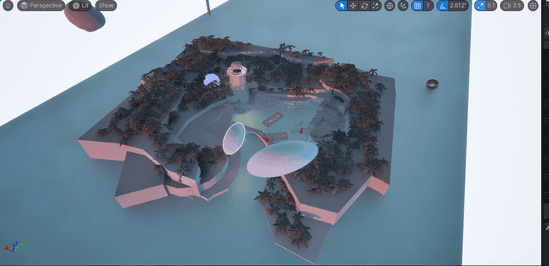
Above is the completed blockout (minus smaller details on buildings) of my level - it is a small bay town with blimps used as delivery vehicles. There are four main areas: the start (a small, cramped town), the cliffside, the lighthouse and the end (delivery warehouse & blimp). The player’s main route passes through these four areas, each with different vertical levels of travel/exploration. My level design focuses on exploration, rather than puzzles and mystery, as the player assumes the role of an experienced deliveryperson, who seems to have a lot of spare time to explore beyond their typical delivery route.
what I learned
This project was my first exploration into level design and I am quite proud of what I have been able to do. I was able to design with players' curiosity in mind, as well as expand beyond linear design. If I worked on this project further, I would like to expand the map vertically to implement more of the player character's abilities, as well as the backstory to the level itself (ie. blimps, flight). If I were to rework this project, I would like to build stages or multiple levels which the player can travel between to make the exploration more engaging.